ip
Louie: The Task Management App
User Guide
Louie is text command-based app that helps you to keep track of your tasks.
Product Image
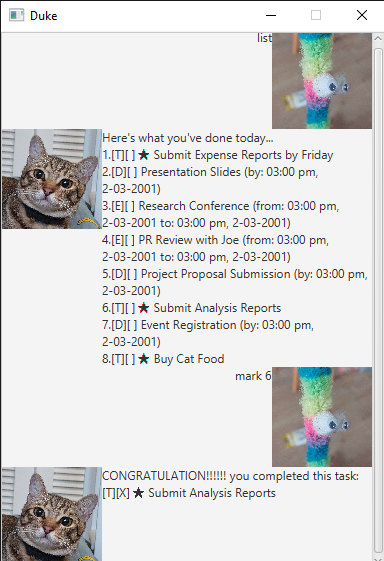
Features
:check_mark: Louie manages your tasks in a list format.
- Task come in three different types: Todos, Deadlines and Events
:check_mark: Mark your tasks as complete and Louie Will congratulate you!!
:check_mark: You can prioritise tasks and they appear with a :star: star.
:check_mark: Is named after a real cat (!!!).
Commands to manage your tasks
Interact with Louie through typed commands.
Commands are in the form of COMMANDNAME ... /OPTION ...
list: View your tasks.
Usage: list
Louie will respond with a list of all tasks on your list.
todo, deadline, event: Add a task to your list.
Usage: todo NAME
Adds a todo task named NAME to your list.
Usage: deadline NAME /by DATE
Adds a deadline task named NAME to your list, that is due by DATE.
Dates have to follow the format YYYY-MM-DD MMHH.
Example: deadline Homework /by 2024-03-12 2359 adds a reminder to do your homework by 11:59 pm, 12 March 2024
Usage: event NAME /from START_DATE /to END_DATE
Adds a todo task named NAME to your list. The event starts on START_DATE and ends on END_DATE. Dates have to follow the same format as in the deadline command.
mark, unmark: Mark a task as done.
Usage: mark INDEX, where INDEX is the number of the task as it appears using the list command.
When you’re done with a task, you can mark it with this command.
Marked tasks will appear with as such in the list command.
Usage: unmark INDEX.
You can also reverse this action with the unmark command.
delete: Remove a task from your list.
Usage: delete INDEX, where INDEX is the number of the task as it appears using the list command.
find: Filter your tasks by their names.
Usage: find TEXT, where TEXT is what you want to search your tasks for.
Louie will respond with a list of all tasks that contain TEXT in their names.
bye: Exit the app.
Usage: bye
prioritise, deprioritise: Mark a task as important.
Usage: prioritise INDEX, where INDEX is the number of the task as it appears using the list command.
Prioritised tasks will appear as such in the list command.
Usage: deprioritise INDEX.
You can also reverse this action with the deprioritise command.